Competitor audit in Google Maps: who wins and why
How to check your competitors in Google Maps for free: ranking for a service and city, ratings, business profiles and websites. How to read the result and what to do first.
When a customer looks for a plumber, a hairdresser or a company that builds terraces, they most often type the service and the city into Google or Maps. They see a few businesses with ratings, stars and a number of reviews, and then call one of the first. If your business isn’t there or has fewer reviews than your neighbor, the customer picks the neighbor. You don’t even know that such a customer existed.
So it’s good to know how you stack up against your competitors. In this article I show how to check this for free in my Competitor audit tool, how to read the result and where to start with improvements. The screenshots come from a real analysis for the phrase “hydraulik Olsztyn” (plumber Olsztyn), but I hid the business names.
How to run the audit
You enter three things: what your customers search for (e.g. “plumber”), the city and, optionally, your own business, that is, your website address or the name from your business profile. After about a minute you see the ranking and a comparison. You don’t need to register.

Enter the phrase the way a customer would type it: “plumber”, not “plumbing and sanitary services”. If you offer several services, run separate analyses, e.g. “bathrooms” and “tiler”, because Google often shows different businesses for them.
What the tool checks
A customer chooses a business by several things at once, so the tool compares six areas:
- Position in Google Maps: the order of businesses for your phrase and city, that is, whether you are in the top three, the top ten, or not at all.
- Ratings and reviews: the average rating and number of reviews against the median in the area, and how far you are from the leader.
- Business profile: whether the business has a website, phone number, opening hours and photos linked.
- Website: HTTPS, mobile version, title and description in Google, company details, a click-to-call phone number and a form.
- Speed: the Google PageSpeed score on mobile for your website and for the websites of the strongest competitors.
- Marketing: who measures traffic on their website and who probably advertises, because they have Google Ads or Meta tags.
The business data comes from Google Maps, through the official Google API. Business websites are checked by my robot, which fetches only the home page, and speed is measured by Google PageSpeed Insights.
How to read the ranking
The most important part of the report is the table with the order of businesses. For each one you see the rating with the number of reviews, the completeness of the business profile, the website score, speed and “online strength”, that is, a single indicator that combines the business profile (55%) and the website (45%).
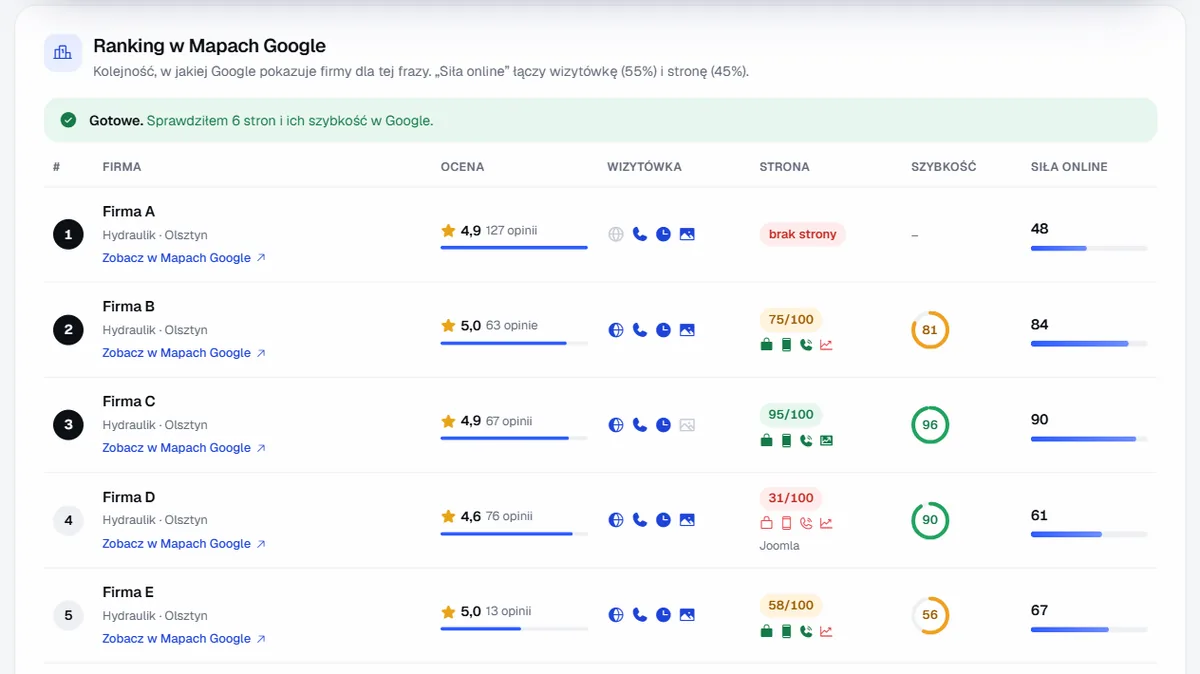
The screenshot shows a typical situation well: the business in first place has 127 reviews and a rating of 4.9, but has no website. A customer who wants to check what it does and how much it might cost has nowhere to click. The businesses in second and third place have fewer reviews but better “online strength”, because they add a working website to a good business profile. That is a concrete opportunity: it is often easier to overtake the leader with a website and a business profile than with the number of reviews alone.
Remember, too, that the order on your phone may be slightly different. Google tailors results to the place where you are standing and to your search history. The analysis shows results for a phrase with the city name, without those adjustments.
Market map: where you stand against others
Below the ranking there is a market map. Each dot is a business: the higher it is, the better the rating; the further to the right, the more reviews. The quadrants hint at who is where:
- Leaders: many reviews and a high rating, you compete with them for the top spots,
- Good ratings, few reviews: businesses that can move up quickly if they start collecting reviews,
- Many reviews, weaker ratings: customers know them, but aren’t delighted,
- Catching up to do: few reviews and lower ratings.
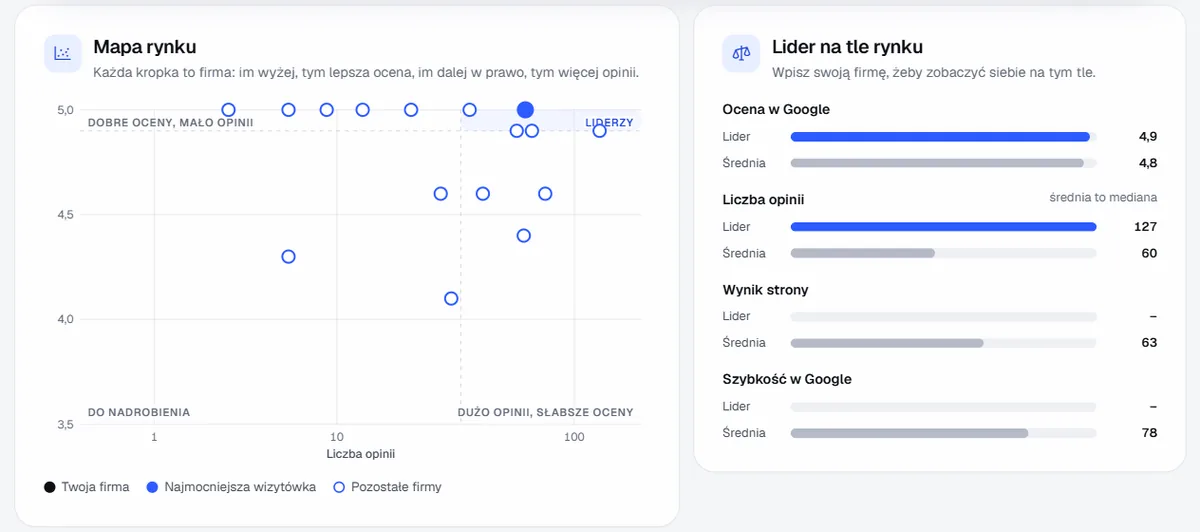
Next to it is a comparison of the leader with the market average: rating, number of reviews, website score and speed. If you enter your business, you will see yourself there too.
Takeaways: what to do first
At the end of the report there is a list of takeaways, starting with the most urgent. The tool adds them based on data from the ranking and from competitors’ websites, e.g. how many businesses have no website, how many websites don’t work well on mobile, or how many competitors measure traffic on their website.
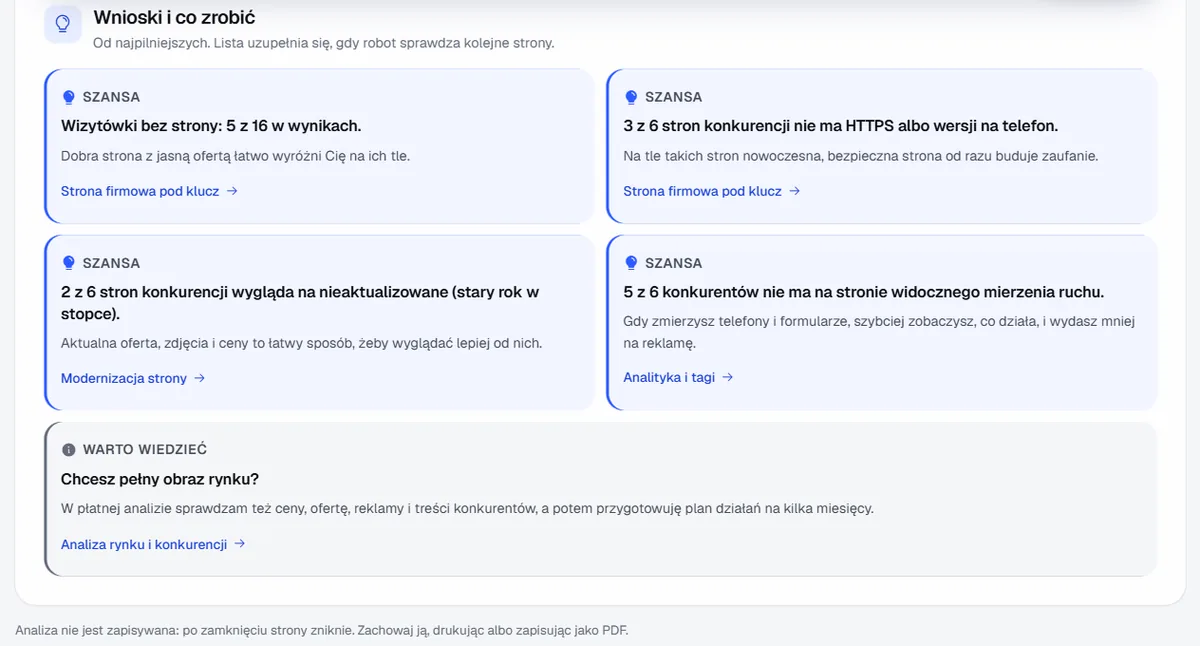
If the report shows many things at once, I suggest this order:
- Google Business Profile. Category, a description with the service and city, hours, photos and website address. In its Business Profile help, Google stresses that ranking in local results is influenced by relevance, distance and prominence, and that completed information helps relevance.
- Reviews. Ask satisfied customers for a rating by sending them a direct link, and reply to every review, including critical ones. The number and quality of reviews is a signal for Google and the most important reason a customer picks one business from several.
- Website. If you don’t have one or it is outdated, it’s a quick chance to stand out against businesses without a website. To start, a simple business card page is enough, e.g. from my free website builder.
- Measuring and advertising. When the basics work, measure phone calls and forms, and only then add advertising in Google.
What the free audit won’t show
The tool compares what is publicly visible: Google Maps and businesses’ home pages. It doesn’t check prices, the content of the offer, ads in detail or how competitors handle customers over the phone. It also doesn’t fetch the text of reviews. I prepare a full picture of the market, with prices, offer, ads and an action plan for several months, in the paid market and competitor analysis.
I don’t store the business data from Google: after you close the page the analysis disappears, so if you want to keep it, print it or save it as a PDF.
What the improvements cost
For orientation, my net prices:
- completing and optimizing a Google Business Profile from PLN 490,
- turnkey business website from PLN 4,900, and the simpler Starter website from PLN 1,490,
- analytics and call tracking from PLN 990,
- Google Ads campaign from PLN 990,
- SEO from PLN 790 a month.
Check your competitors
Run the competitor audit for your service and city. Under the result, you can send me the analysis with one click, and within 24 hours I will reply with a plan: what to do first and how much it costs. New clients get a 20% discount on their first order. If you also want to check your own website, read how to check your business website for free.
Frequently asked questions
Yes, with no registration. Every analysis uses paid Google data, which is why the tool has a limit: two analyses per hour and five per day from a single connection.
Google tailors results to the place where you are standing and to your search history. The analysis shows results for a phrase with the city name, without those adjustments, so it reflects well what most customers in your area see.
No. The business data comes from Google Maps, and my robot fetches only home pages, just like an ordinary visitor. It leaves no information about who ordered the analysis.
Complete your Google Business Profile: category, a description with the service and city, hours, photos and website address. Then regularly ask satisfied customers for reviews and reply to every one of them. That usually gives more than any changes on the website itself.
Related services
Have a similar project?
Describe what you need and I’ll send a quote within 24 hours. New clients get 20% off their first project.